01 — Hello World
If you can write a Go program that prints to stdout, you can write a lofigui app. The model function below is ordinary Go code — Print(), a loop, a sleep. The only difference is the output goes to a web page instead of a terminal. No WebSocket, no JavaScript — just the browser's built-in refresh mechanism doing the work.
Interactivity level: 1 — Teletype (async polling) State scope: Global (server) / Individual (WASM build, per-browser SW process)
app.RunWASM(model) call — the library auto-generates the SW bootstrap so the example itself has no templates/ directory. 01a is the same behaviour with every wire visible (explicit setupRoutes(), hand-written SW bootstrap). 01b adds gzipped WASM on top of 01a, showing the DecompressionStream + cache plumbing.
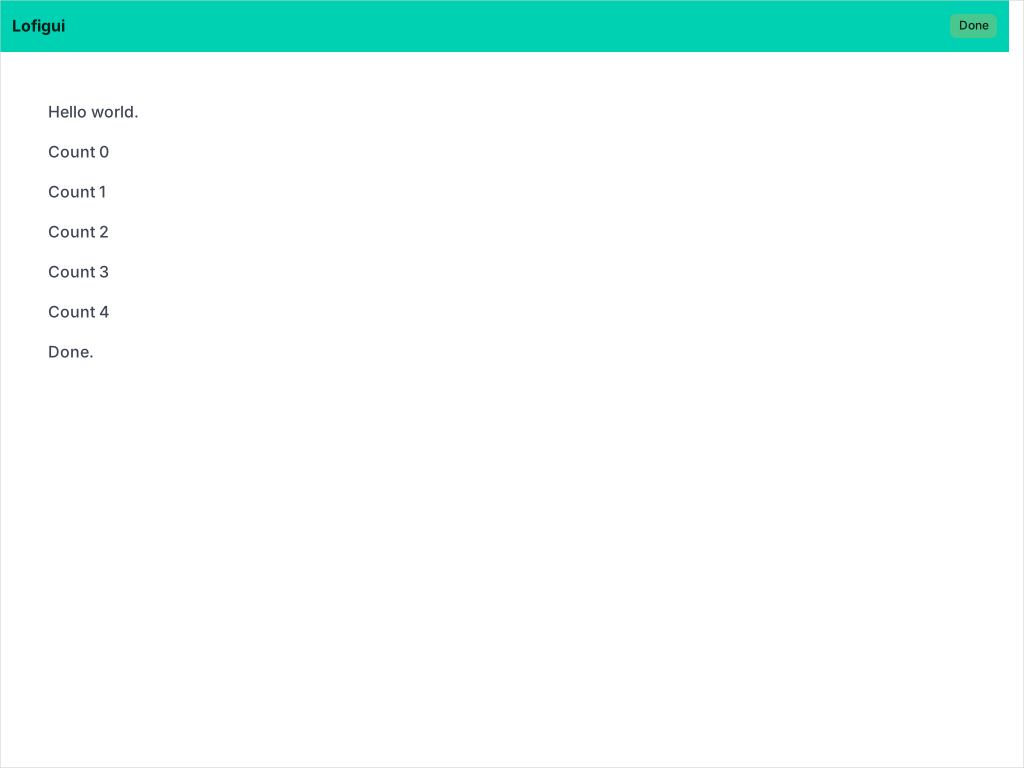
The model — your application logic
A lofigui app has two parts: a model that does the work and a server that wires it to the web. This is the model:
// Model function - this is your application logic.
// Just like a terminal program: print output and sleep between steps.
func model(app *lofigui.App) {
    lofigui.Print("Hello world.")
    for i := 0; i < 5; i++ {
        app.Sleep(1 * time.Second)
        lofigui.Printf("Count %d", i)
    }
    lofigui.Print("Done.")
}
fmt.Println() — each call adds a line of output. The difference: instead of writing to the terminal, it appends HTML to a buffer that the browser displays.
Handle calls StartAction() before launching the model goroutine, which enables auto-refresh polling. When the model function returns, Handle calls EndAction() automatically — the browser stops refreshing and the output stays put.
The server — wiring it up
Two lines: create an app, run the model.
func main() {
    app := lofigui.NewApp()
    app.Run(":1340", model)
}
/, a cancel handler on /cancel, and starts the server with graceful shutdown. When the model completes, the server exits. This is the HTTP equivalent of RunWASM — one call does everything.
NewApp() provides a built-in template (Bulma-styled navbar with cancel button), 1-second refresh, and a /favicon.ico handler. Later examples unbundle Run into Handle, HandleCancel, and ListenAndServe when they need custom routes or multiple endpoints.
The full source is split across two files: main.go (the server) and model.go (the application logic). The model is in its own file so it can be shared with the WASM build — if you don't need a WASM version, a single main.go is all you need.
How it works
The browser hits /, the server starts the model and returns a page with a Refresh header. The browser reloads every second, showing new output as the model prints. When the model returns, polling stops and the server exits cleanly.
See technical details for a full sequence diagram and internals.
Cancellation
Both the server and WASM builds support cancelling a running model mid-flow. The navbar shows a Cancel button while the model is running. app.Run() handles this automatically; when unbundled, register the cancel endpoint explicitly:
// Unbundled form (used in later examples with custom routes):
http.HandleFunc("/cancel", app.HandleCancel("/"))

// WASM: goCancel() is exported automatically by RunWASM
EndAction() cancels the context. The next call to Print, Sleep, or Yield in the model goroutine panics with an internal sentinel. Handle's recover wrapper catches it, and the goroutine exits cleanly. The buffer retains its partial output. The model doesn't need any explicit cancellation code.
See technical details for the full cancel flow.
WASM: running in the browser
The live demo runs the same model() function compiled to WebAssembly — entirely in your browser, no server required. A service worker intercepts HTTP requests and routes them to Go's net/http handlers running inside the WASM binary. The browser sees real HTTP responses — forms, redirects, Refresh headers — identical to the server version.
Because the model lives in its own file (model.go), both the server and WASM builds share it unchanged. A separate main_wasm.go file (build-tagged js && wasm) replaces the server with a single call:
//go:build js && wasm

package main

import "codeberg.org/hum3/lofigui"

func main() {
    app := lofigui.NewApp()
    app.RunWASM(model)
}
App.Run. It registers the same routes (display, start, cancel, favicon) on an http.ServeMux and serves them via go-wasm-http-server. The browser page uses a service worker (sw.js) that loads the WASM binary and intercepts fetch events. No custom JavaScript polling — just standard HTTP.
GOOS=js GOARCH=wasm go build -o main.wasm . produces the binary. Go provides wasm_exec.js as a loader. The Taskfile.yml docs:build-wasm task automates this for all examples.
Gzipped WASM
Example 01 itself only ships the plain (~11 MB) WASM binary — the compact API accepts that trade for a one-line deployment. Projects that want a smaller download follow example 01b, which layers DecompressionStream + a cached decompressed binary on top of 01a's explicit SW wiring. The decompression plumbing is visible enough that it's worth reading as its own tutorial rather than hidden behind a flag.
Server vs WASM lifecycle
Both the server and WASM builds use the same HTTP handler pattern. The lifecycles differ only in how the server starts:
- Server —
app.Run(":1340", model)starts a real HTTP server. The model auto-starts on the first request to/. When the model completes, the server exits (unlessLOFIGUI_HOLD=1is set). - WASM —
app.RunWASM(model)registers the same routes but serves them via a service worker. The user clicks a Start button (HTML form POST to/start). The browser's Refresh header handles polling — no custom JavaScript needed.
RunWASM into setupRoutes() + wasmhttp.Serve().